 付款。
付款。(在家觀看 = 0%,在校觀看 = 100%)
100% 在校觀看日期及時間:
自由選擇,點選以下地區觀看辦公時間及位置

課時: 18 小時
享用時期: 9 星期。進度由您控制,可快可慢。
課堂錄影導師:Larry
在校免費試睇:首 1 小時,請致電以上地點與本中心職員預約。
本課程提供在校免費重睇及導師解答服務。
(在家觀看 = 100%,在校觀看 = 0%)
100% 在家觀看日期及時間:
每天 24 小時全天候不限次數地觀看
課時: 18 小時
享用時期: 9 星期。進度由您控制,可快可慢。
課堂錄影導師:Larry
在校免費試睇:首 1 小時,請致電以上地點與本中心職員預約。
本課程提供導師解答服務。
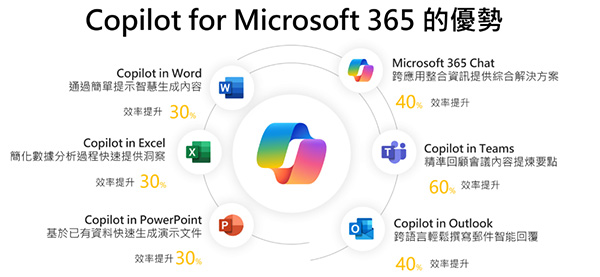
微軟為您的企業提供 AI 整合式解決方案 - Microsoft 365 Copilot AI 與智能代理 (Agents) 的強大功能,令使用 Microsoft 365 的您進入 AI 協作新時代,並透過自動化防禦機制協助保護您的企業資產。
透過智能代理 (Agents) 極大幅度地提升生產力,同時利用 Microsoft Purview Data Governance 數據管治功能降低資訊外洩風險,節省相關資訊安全審核及合規性開支!
微軟為您的中小企業提供整合式解決方案,極大幅度地節省購買軟件使用授權 (Software License) 的成本及I.T. 相關硬件基建 (Hardware and Server infrastructure) 等等開支!
Microsoft 365 AI 技術助您事半功倍

- 運用 Microsoft 365 Copilot 內建的生成式 AI 工具,自動撰寫文章、分析數據並製作簡報。
- 使用 AI 驅動的企業級電子郵件,自動摘要長篇郵件並草擬回覆。
- 透過 AI 搜尋技術,在龐大的雲端檔案空間內精準提取所需資訊。
- 輕鬆整合 Copilot Agents 智能代理,針對特定業務流程進行自動化處理。
Microsoft 365 AI 技術助您提升共同作業成效

- 在 Microsoft Teams 通訊軟體整合小組、資源與 Copilot Agent,即時總結會議重點及行動清單。
- 透過 AI 翻譯與溝通工具,無縫連繫全球客戶、同事和供應商。
- 舉行或參與智能線上會議,即使您會議時缺席也能透過 AI 回顧功能掌握所有決策。
- 您可以隨時隨地透過任何裝置,安全地使用企業 AI 能力工作。
Microsoft 365 AI 技術保護您的資料安全

- 防範 AI 安全威脅:識別並阻止惡意提示 (Prompt Injection) 及非法存取。
- 防止過度分享:監控 OneDrive 及 SharePoint 中的文件權限,防止敏感資料因「過度分享」而被外界錯誤獲取。
- 控制 AI 數據存取:精準定義 AI 擁有多少權利來處理特定的商務資訊,阻止 AI 存取商業機密。
- 自動化合規工具:利用 Microsoft Purview 確保 AI 應用符合法規 (Compliance) 與隱私政策 (例如中國個人信息保護法 PIPL、香港個人資料 (私隱) 條例 PCPD、美國 HIPAA 及歐盟 GDPR 等等)。
Microsoft 365 商務基本版 (Business Basic) 是可取得 Microsoft 365 Copilot Business AI 服務的基礎!
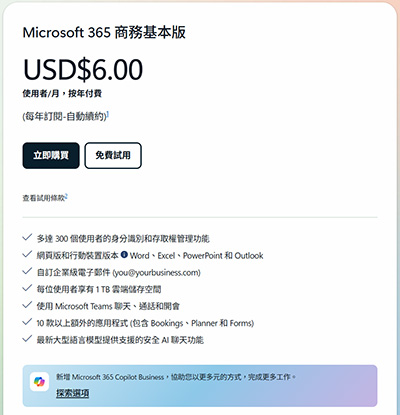
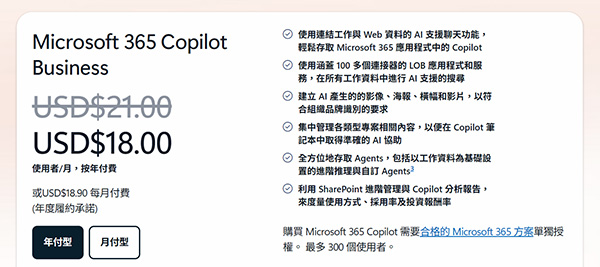
總結來說,每位使用者僅須付月費 USD $24 (~ HKD $197),便可以獲得包含 Microsoft 365 Business Basic + Copilot Business, Purview以及Microsoft Entra ID等等一系列安全管理服務!
本課程將教導企業如何以最低成本 (Business Basic + Copilot Add-on) 配置最強 AI 辦公環境,避免購買不必要的昂貴授權。
為什麼要學 AI Agent?近年,AI 不再只是對話框,而是能自動執行任務的『代理 (Agents)』。本課程領先市場,涵蓋 Copilot AI Agent 的建立與管理。
本課程教授的技術適用於各大中小型企業,能讓員工發揮出頂級的 AI 人機協作生產力,並能保護各個裝置及雲端上的商務資料,為大中小型企業提供了一個完善的解決方案。
本課程獨家教導如何透過 Microsoft Purview 識別並修復 SharePoint 及 OneDrive 中的『過度分享』權限,從而避免員工在詢問 AI 時,AI 意外讀取到不應公開的標書機密例如投標報價、成本結構、利潤率等等。
修畢本課程後,學員便可考取下列 1 張國際認可證書:
Microsoft 365 Certified: Copilot and Agent Administration Fundamentals
| 課程名稱: |
Microsoft 365 Certified Fundamentals 國際認可證書課程 (1科 M365 商務雲端,Copilot & AI Agent) - 簡稱:Microsoft 365 Fundamentals Training Course |
| 課程時數: | 18 小時 (共 6 堂,共 1 科) |
| 適合人士: | 志考取 Microsoft 365 Certified Fundamentals 證書人士 中小企業老闆 / 管理層 / 商務人士 創業青年 初級技術支援人員 或 任何行業的非技術文職人員 |
| 授課語言: | 以廣東話為主,輔以英語 |
| 課程筆記: | 本中心導師親自編寫英文為主筆記,而部份英文字附有中文對照。 |
| 1. 模擬考試題目: | 本中心為學員提供模擬考試題目,每條考試題目均附有標準答案。 |
| 2. 時數適中: | 本中心的 Microsoft 365 Certified Fundamentals國際認可證書課程 (1科 M365,Copilot & AI Agent) 時數適中,有 18 小時。
|
| 3. 導師親自編寫筆記: | 由本中心已擁有五項 MCITP,十多項 MCTS,MCSA 及 MCSE 資格,並有教授 Microsoft 相關課程 20年以上經驗的資深導師 Larry Chan 親自編寫筆記,絕對適合考試及實際管理之用,令你無須「死鋤」如字典般厚及不適合香港讀書格調的書本。 |
| 4. 一人一機上課: | 本課程以一人一機模式上課。 |
| 5. 免費重讀: | 傳統課堂學員可於課程結束後三個月內免費重看課堂錄影。 |
Microsoft 已公佈考生只要通過以下 1 個 Microsoft 365相關科目的考試,便可獲發 Microsoft 365 Certified: Copilot and Agent Administration Fundamentals 國際認可證書:
| 考試編號 | 科目名稱 |
| AB-900 | Microsoft 365 Copilot and Agent Administration Fundamentals |
本中心為Microsoft指定的考試試場。報考時請致電本中心,登記欲報考之科目考試編號、考試日期及時間
(最快可即日報考)。臨考試前要出示身份證及繳付每科HK$566之考試費。 考試不合格便可重新報考,不限次數。欲知道作答時間、題目總數、合格分數等詳細考試資料,可瀏覽本中心網頁 "各科考試分數資料"。 |
|
課程名稱:Microsoft 365 Certified Fundamentals 國際認可證書課程 (1科 M365 商務雲端,Copilot & AI Agent) - 簡稱:Microsoft 365 Fundamentals Training Course |
Exam AB-900: Microsoft 365 Copilot and Agent Administration
1. Microsoft 365 Copilot and Agents Overview
1.1 Introduction to Digital Workspace in Agentic AI era and Copilot
1.1.1 Introduction to Microsoft 365 Copilot
1.1.2 Microsoft 365 Copilot architecture
1.1.3 Microsoft Graph + Work IQ: Copilot’s intelligence foundation
1.1.4 Large Language Models (LLMs)
1.1.5 Copilot orchestration service
1.1.6 Introduction to the Copilot prompt lifecycle
1.2 Agents Overview
1.2.1 Types of agents
1.2.2 Agents in Microsoft 365 Copilot Chat
1.2.3 Agents in SharePoint
1.2.4 Tools used for creating agents in Copilot Chat and SharePoint
1.3 Compare Microsoft 365 Copilot and agents
1.3.1 Compare core capabilities and key benefits
1.3.2 Explore how Copilot and agents support productivity and automation
1.3.3 Best practices for managing governance, identity, and runbooks
1.3.4 Operational limitations and common failure modes
1.4 Compare Microsoft 365 Copilot licensing models
1.4.1 Copilot licensing plans and feature comparison
1.4.2 Examples that describe key differences
1.4.3 Microsoft 365 Copilot monthly license model
1.4.4 Pay-as-you-go Copilot model
1.4.5 Differences between licensing models
1.4.6 License implications for Microsoft SharePoint
1.4.7 Cost considerations and budgeting tips
2. Plan and deploy Microsoft 365 Copilot and agents
2.1 Copilot features that can be enabled or disabled
2.2 Administrative control over feature availability
2.2.1 Case Study: Departmental feature enablement
2.3 Feature planning and governance considerations
2.3.1 Case Study: Phased deployment with groups
2.4 Permissions and roles required to manage these features
2.4.1 Case Study: Governance committee in action
2.5 Best practices for feature rollout
2.5.1 Case Study: Role delegation in a global enterprise
2.6 The Microsoft 365 Copilot Adoption site
2.6.1 Case Study: Structured rollout at a university
2.7 Manage your AI agents with Agent365
2.8 Real-world use cases for Copilot and agents
2.8.1 Introduction
2.8.2 Use cases for Microsoft 365 Copilot
2.8.3 Use cases for the Researcher agent in Microsoft 365 Copilot
2.8.4 Use cases for the Analyst agent in Microsoft 365 Copilot
2.8.5 Use cases for other prebuilt agents
2.8.6 Use cases for custom agents built by everyday business users
2.8.7 Use cases for SharePoint agents
2.8.8 Use cases for custom, advanced Copilot agents
2.8.9 Selecting the right tool (Copilot vs. Agent)
3. Administrative tasks for Microsoft 365 Copilot
3.1 Preface
3.2 Manage Copilot licenses and pay-as-you-go billing
3.2.1 How to assign Microsoft 365 Copilot licenses to users
3.2.2 Assigning licenses to individual users
3.2.3 Assign licenses through groups
3.2.4 Enable pay-as-you-go billing policies for Copilot services
3.3 Monitor and adjust pay-as-you-go Copilot usage
3.4 Usage monitoring scenarios and best practices
3.5 Monitor Microsoft 365 Copilot usage and adoption
3.5.1 About Copilot Usage and Adaption
3.5.2 Tracking user adoption of Microsoft 365 Copilot
3.5.3 Use Copilot Analytics for deeper analysis
3.5.4 Identify adoption trends and usage patterns
3.5.5 Strategies to drive adoption across the organization
3.5.6 Reporting tools and dashboards
4. Manage and govern Microsoft 365 Copilot prompts
4.1 Prompt management in Microsoft 365 Copilot
4.2 How to manage prompts
4.3 Tips for prompt standardization across teams
4.4 Operational best practices for Microsoft 365 Copilot
4.4.1 Configure admin roles and permissions
4.4.2 Best practices for license assignment and user onboarding
4.4.3 Troubleshooting common issues
4.4.4 Communicating changes to end users
5. Administrative tasks for Microsoft 365 Copilot agents
5.1 Create a Microsoft 365 Copilot Chat agent - Part A
5.1.1 Use the Describe tab (if available) to begin the agent creation process
5.1.2 Create a Microsoft 365 Copilot Chat agent - Part B
5.2 Manage user access and permissions for Agents
5.2.1 Licensing and agent types
5.2.2 Overview to configuring user access to agents
5.2.3 Assign a Copilot license in the Microsoft 365 admin center
5.2.4 Assign an environment role in the Power Platform admin center
5.2.5 Group-based role assignments
5.2.6 Security best practices
5.3 Agent approval and governance
5.3.1 Agent types you can manage
5.3.2 Understanding the approval process for agents
5.3.3 Role of admins and stakeholders in the approval process
5.3.4 Managing agent updates and version control
5.3.5 Governance policies for agent deployment
5.3.6 Security and compliance considerations
5.4 Agent Testing
5.4.1 Introduction to Testing an Agent
6. Data Security Posture Management for AI
6.1 DSPM for AI Overview
6.2 Using DSPM for AI
6.3 Security Copilot Integration in Microsoft Purview
7. Overview of Microsoft 365 Enterprise
7.1 Components, Plans and Features of Microsoft 365 Enterprise
7.1.1 Components of Microsoft 365 Enterprise
7.1.2 Microsoft 365 Enterprise Plans
7.1.3 Microsoft 365 Enterprise Benefits
7.1.4 Microsoft 365 Enterprise Local and Cloud Productivity services
7.1.5 Microsoft 365 Enterprise based Modern Workplace
7.1.6 Microsoft 365 for enterprise plans
7.1.7 The Foundation Infrastructure of Microsoft 365 Enterprise
7.1.8 Workloads and Online Services provided by Microsoft 365 Enterprise
7.2 End of Service for Office 2010 clients, Servers and Windows 7
7.3 Three Ways to deploy Microsoft Enterprise 365
7.4 Additional Microsoft 365 solutions
7.4.1 Microsoft 365 Business
7.4.2 Microsoft 365 Education
7.4.3 Microsoft 365 Government
8. Microsoft 365 Cloud Architecture – Cloud Identity services
8.1 Microsoft Cloud Identity solutions for enterprise architects
8.2 Using Microsoft Entra ID as your Identity as a Service (IDaaS) provider
8.2.1 About Microsoft Entra ID Free Edition
8.2.2 About Microsoft Entra ID Premium Edition
8.3 Microsoft Entra ID integration capabilities
8.3.1 Integration across Microsoft’s cloud
8.3.2 Windows 10/11 Azure AD Join
9. Microsoft 365 Cloud Architecture – Cloud Security
9.1 Understanding Cloud Service Models
9.1.1 Software-as-a-Service (SaaS)
9.1.2 Platform-as-a-Service (PaaS)
9.1.3 Infrastructure-as-a-Service (IaaS)
9.1.4 Private Cloud
9.1.5 Responsibility of each Cloud Service Models
9.1.6 Governance & Security Policy
9.1.7 Administrative Privilege Management
9.1.8 Identity Systems and Identity Management
9.1.9 Threat Awareness
9.1.10 Data Protection
10. Microsoft 365 Cloud Architecture – Cloud Networking
10.1 Evolving your network for cloud connectivity
10.1.1 Before the cloud
10.1.2 After the cloud
10.1.3 Networking for SaaS
10.1.4 Networking for Azure PaaS
10.1.5 Networking for Azure IaaS
10.2 Elements and Connectivity options
10.2.1 Steps to prepare your On-premises network
10.2.2 Steps to prepare your Internet connectivity
10.2.3 Microsoft Cloud Connectivity options
10.3 Using ExpressRoute for connecting to Microsoft Cloud
10.3.1 Without ExpressRoute
10.3.2 With ExpressRoute
10.3.3 ExpressRoute Connectivity Models
10.3.4 ExpressRoute peering relationships to Microsoft 365 Cloud Services
10.3.5 Example deployment and traffic flow with ExpressRoute connection
10.4 Designing Networking for Azure Platform-as-a-Service
10.4.1 Internet Bandwidth for Azure PaaS
10.4.2 Using Azure Application Gateway
10.4.3 Azure Traffic Manager