- Date & Time
- Introduction
- Features
- Certificate
- Exam Info
- Contents
Recommended Service: Video On Demand (Watch at home: 0%, Watch at school: 100%)
You can register via WhatsApp, phone, or this website. Once we confirm that a place has been reserved for you, you can pay the course fee by FPS. The process is simple!
* Government departments can use P Card for payment.
If using P Card to pay the exam fee, an additional 2.5% administrative fee will be added.
| Free trial at school: |
Please call to schedule an appointment with our staff for the first 3 hours. View phone numbers for each location
| Mongkok |
2332-6544 |
| Kwun Tong |
3563-8425 |
| Shatin |
2151-9360 |
|
| Free review at school: |
In order to repeatedly review the entire course, students can review the lesson recordings an unlimited number of times at the selected location during the service period! |
| Instructor Support: |
Students can ask course related questions after watching a lesson and our course instructor is eager to answer questions one-on-one! |
| Course Hours: |
42 Hours |
| Service Period: |
21 weeks starting from the enrolment date. The learning progress is under your control; you can speed it up or slow it down. |
| Instructor: |
Larry |
Recommended Service: Video On Demand (Watch at home: 36%, Watch at school: 64%)
You can register via WhatsApp, phone, or this website. Once we confirm that a place has been reserved for you, you can pay the course fee by FPS. The process is simple!
* Government departments can use P Card for payment.
If using P Card to pay the exam fee, an additional 2.5% administrative fee will be added.
| Free trial at school: |
Please call to schedule an appointment with our staff for the first 3 hours. View phone numbers for each location
| Mongkok |
2332-6544 |
| Kwun Tong |
3563-8425 |
| Shatin |
2151-9360 |
|
| Free review at school: |
In order to repeatedly review the entire course, students can review the lesson recordings an unlimited number of times at the selected location during the service period! |
| Instructor Support: |
Students can ask course related questions after watching a lesson and our course instructor is eager to answer questions one-on-one! |
| Course Hours: |
42 Hours |
| Watch at Home & School: |
Watch the first 15 hours at home, and the last 27 hours at school. |
| Prohibited software of "Watch at Home": |
Software that potentially infringe our copyright. |
| Service Period: |
21 weeks starting from the enrolment date. The learning progress is under your control; you can speed it up or slow it down. |
| Instructor: |
Larry |
| Watch at Home: |
Terms and rules of service, enrolment procedure and demonstration video |
Attention! Customers must check the school's registration number with the education bureau to confirm that the school is registered, in order to avoid unnecessary losses!
SYSTEMATIC is a Microsoft certified partner.
|
Course Instructor Larry has written the course notes according to the latest AZ-104 exam requirements and provides live Azure Cloud demonstrations during class! Larry has over 10 years of hands-on Azure Cloud experience and has been teaching Azure Cloud-related courses at our centre for many years, including Administrator Associate, Solutions Architect Expert, Security Engineer, and more.
Larry also teaches other cloud courses such as Google GCP, Amazon AWS, and Alibaba Cloud, and frequently provides cloud solutions and professional advice to local enterprises (e.g., HKEX BSS partners, OTP-C securities trading platforms, and vEPC/NFV partners for major 4G/5G telecom operators).
|
|
Advantages of Microsoft Azure Cloud
Azure has over 70 compliance offerings, providing more comprehensive compliance coverage, and is the first cloud provider to contractually meet the requirements of the General Data Protection Regulation (GDPR).

To protect your organization, Azure embeds security, privacy, and compliance into its development methodology, and has been recognized by U.S. government agencies as the most trusted cloud, earning FedRAMP (The Federal Risk and Authorization Management Program) High authorization covering 38 Azure services.
Additionally, Azure IP Advantage provides industry-leading intellectual property protection, allowing you to focus on innovation without worrying about unfounded lawsuits.
Azure provides hybrid consistency across a hybrid cloud environment at any time and place, encompassing application development, security and management, identity management, and data platforms. This helps reduce both the risks and costs of a hybrid cloud environment. Azure also enables portability for applications and workloads.
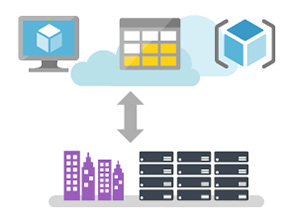
Furthermore, when migrating Windows Server Virtual Machines to Azure, you can save up to 40% in costs through Azure Hybrid Benefit.
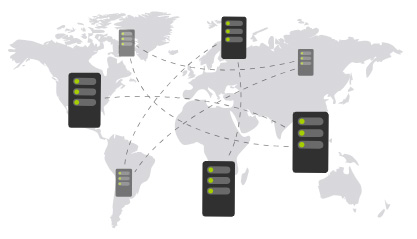
Scale globally with 60 Azure Regions: allowing you to choose the data centers and regions that suit you and your customers, so you can get the performance and support you need.
Accelerate Your Development with the Leading Cloud Platform!
The industry recognizes Azure as the only cloud provider with leading Infrastructure as a Service (IaaS), Platform as a Service (PaaS), and Software as a Service (SaaS) solutions.
In fact, according to the Forrester Total Economic Impact study, Azure PaaS can help you improve productivity and increase your ROI (Return On Investment). This is thanks to Azure offering over 100 services to turn your ideas into solutions and end-to-end management experiences, and delivering applications using agile practices.
You can develop and build using any development tools or languages, in your own way, with the tools, applications, and frameworks of your choice (such as Jenkins and Chef). As a leading open-source contributor on GitHub, Microsoft actively supports many open-source community projects (such as Kubernetes, fluentd, and Helm), and has established a unique partnership with Red Hat to provide coordinated multilingual support across multiple products.
Unleash Your Creativity with Unmatched Intelligent Capabilities!
Using recognition APIs, Bots, machine learning services, and Blockchain as a Service (BaaS) capabilities found only in Azure, you can build intelligent solutions at scale. By combining these capabilities with powerful GPU (Graphics Processing Unit) computing, you can accelerate deep learning, enable high-performance computing simulations, and use NVIDIA GPUs in Azure for real-time data analytics.
Dive Deep into Big Data with Comprehensive Advanced Analytics Solutions!
Using Azure Cosmos DB, you can integrate unlimited elastic scaling into your applications, then use business analytics solutions such as demand forecasting and inventory optimization to turn your data into a competitive advantage. Quickly build, customize, and deploy best practices using solution templates, and get transformative insights into all your data through Azure SQL Data Warehouse.
Easily Implement Ready-to-Use IoT!
Using preconfigured solutions in the Azure IoT Suite, you can quickly get started with the most common Internet of Things (IoT) scenarios, such as remote monitoring and predictive maintenance. The design is open and customizable, and 46% of Azure IoT certified devices run on Linux, Android, or other open-source technologies.
Manage and Optimize Your Cloud Spending with a Complete Cost Management Solution!
With free Azure cost management, you can maximize the benefits of your cloud resources, manage departmental budgets, and allocate costs. Right-size virtual machines to fully utilize resources, and visualize the cost-effectiveness of the various purchasing options Azure offers.
Get Greater Azure Investment Returns Through Microsoft Cloud!
Get more value from your Azure investment by using one of the industry-leading SaaS services (including Office 365, Dynamics 365, and Enterprise Mobility + Security). Azure shares many foundational features with these services, such as identity management with Azure Active Directory and mobile device management with Intune.
After completing this course, students can obtain the following 1 internationally recognized certificate:
Microsoft Certified Azure Administrator Associate
Microsoft Azure Cloud New Role-based Certifications for the Cloud Era: Master cloud computing technology and embrace future challenges
| Fundamentals: |
|
Advanced: |
 |
|
 |
| An Azure Administrator is responsible for implementing, monitoring, and maintaining Microsoft Azure solutions, including major services related to compute, storage, network, and security. Get certified today. |
|
Master the skills needed to design solutions that run on Azure. A Microsoft Azure Solutions Architect must have expertise in compute, network, storage, and security. |
|
| Course Name: |
Microsoft Certified Azure Administrator Associate Certificate Course (New Version 5)
- Short name: Azure Administrator Training Course |
| Course Hours: |
42 Hours (14 sessions, 1 subject) |
| Suitable For: |
Those aspiring to obtain the Microsoft Certified Azure Administrator Associate certificate, or those wishing to enter the I.T. industry |
| Language of instruction: |
English |
| Course Notes: |
The notes are written primarily in English by our instructor, with some English text accompanied by Chinese translations. |
| 1. Provide mock exam questions: |
Our centre provides students with mock exam questions, each accompanied by standard answers. |
| 2. Appropriate duration: |
Our Microsoft Certified Azure Administrator Associate Certificate Course (New Version 5) has an appropriate duration of 42 Hours.
Enabling students to truly understand and master the course content, and obtain the following 1 certificate within 3 months:
- Microsoft Certified Azure Administrator Associate
|
| 3. Instructor-written notes: |
Written by our centre's senior instructor
with over 20 years of experience teaching Microsoft-related courses, holding five MCITP, over ten MCTS, MCSA, and MCSE qualifications, Larry Chan who personally writes notes perfectly suited for both exam preparation and practical management, eliminating the need to struggle through dictionary-thick books that don't suit Hong Kong learning styles. |
| 4. One computer per student: |
This course is conducted with one computer per student. |
Microsoft has announced that candidates who pass the following 1 Azure Cloud-related exam will be awarded the Microsoft Certified Azure Administrator Associate internationally recognized certificate:
| Exam Code |
Subject Name |
| AZ-104 |
Microsoft Azure Administrator |
Our centre is a Microsoft designated exam venue. To register for an exam, please call our centre to provide the exam code, preferred exam date and time
(same-day registration is available). Before the exam, you must present your ID and pay the exam fee of HK$943 per subject.
Exam questions are transmitted from the Australian exam centre to the computer you will be using. The exam is taken on a computer. All exam questions are in English, with most being single and multiple-choice questions, and the rest being practical lab questions.
After passing the exam, you will receive a confirmation email from Microsoft. Follow the link in the email to log in to Microsoft Credentials Dashboard to download your certificate.
If you do not pass the exam, you may retake it with no limit on the number of attempts. For detailed examination information such as the time allowed, total number of questions, and passing score, please visit our centre's website: "Exam Score Information". |
Course Name: Microsoft Certified Azure Administrator Associate Certificate Course (New Version 5)
- Abbreviation: Azure Administrator Training Course |
1. Manage Azure subscriptions
1.1 Creating a Free Azure account
1.1.1 Services included in Azure Free account
1.1.2 Setting up a Free Account
1.2 Azure RBAC roles, and Entra ID (Azure AD) administrator roles
1.2.1 How roles are related each other
1.2.2 Classic Subscription Administrator roles
1.2.3 Azure account and Azure subscriptions
1.3 Azure RBAC roles
1.4 Deny Assignments
1.5 Entra ID (Azure AD) Administrator Roles
1.6 Custom RBAC Roles
1.7 Differences between Azure RBAC roles and Entra ID (Azure AD) administrator roles
1.8 Elevate access for a Entra ID (Azure AD) Global Administrator
1.9 Azure Price Calculator
1.10 Creating a Virtual Machine on Azure
1.10.1 Introduction to N-Tier architecture
1.10.2 Benefits and Challenges using N Tier
1.10.3 N-Tier architecture with Azure Compute Virtual Machines
1.10.4 To Implement N-Tier Virtual Machine based Architecture
1.11 Enabling Auto-shutdown for VM
1.12 Implementing Azure Bastion
1.13 Manage License in Entra ID (Azure AD)
1.14 Entra ID Administrative Units
1.15 Performing Bulk update to Entra ID (Azure AD)
1.16 About the new name for Azure Active Directory
2. Azure Policy
2.1 Introduction to Azure Policy
2.2 Initiative Definition
2.3 Assigning Initiative Definition to a Specific Scope of resources
2.4 Azure Guest Configuration extension
2.5 Check Compliance
3. Analyze resource utilization and consumption
3.1 Introduction to Azure Monitor service
3.1.1 Metrics
3.2 Metric Alerts
3.3 Understanding Dynamic Threshold with Alert Rules
3.4 Collecting Azure Virtual Machine Logs with Log Analytics
3.5 Azure Monitor Agent
3.6 View or analyze data collected with Log Analytics log search
3.6.1 Creating a Simple Search query
3.6.2 Querying Performance Data
3.7 Using Log Analytics Alerts
3.8 Monitoring your Cost
3.8.1 Add tags to your resources to group your billing data
3.8.2 Reviewing cost at the end of your billing cycle
4. Resource Group and Locks
4.1 Lock resources to prevent unexpected changes
4.2 Moving resources to new resource group
4.3 Removing a resource group
4.4 Using Azure Policy for Tag Governance and Compliance
5. Create and configure storage accounts
5.1 Introduction to Azure Blob Storage
5.2 Storage accounts
5.3 Access Tiers for Block blob data
5.4 Azure Storage Replication
5.5 Storage Account Endpoints
5.5.1 About Require Secure Transfer
5.6 Creating a GPv2 Storage Account
5.7 Creating a Storage Container for upload
5.7.1 Creating a Blob container
5.7.2 Upload a block blob
5.8 Azure Storage Explorer
5.9 Shared Access Signature
5.10 Stored Access Policy
5.11 Virtual Network Service Endpoints and Firewall for Azure Storage
5.12 Create and Associate Service Endpoint Policies
5.13 Storage Analytics
5.13.1 Enabling Azure Storage metrics and viewing metrics data
5.14 Implementing Azure Storage Replication
5.14.1 Azure Storage Account outages and failover
5.14.2 How do I convert my account from LRS to GZRS?
5.14.3 How do I convert my account from GZRS to LRS?
5.14.4 How do I convert my account from GRS to ZRS?
5.14.5 How do I convert my account from ZRS to GRS?
5.15 Blob Versioning
5.15.1 How blob versioning works
5.15.2 Versioning on write operations
5.15.3 Versioning on delete operations
5.15.4 Access tiers
5.15.5 Enable and manage blob versioning
5.16 Designing Entra ID (Azure AD) Authentication for a storage account
5.16.1 Managing User Profile Information
5.16.2 Configure Access with Entra ID (Azure AD) Groups
5.16.3 Creating a Basic Group and add members
5.16.4 Assign RBAC roles for access rights
5.17 Configuring Storage Tiering for Azure Blobs
5.17.1 About Account Level Tiering
5.17.2 Blob Level Tiering
5.17.3 Azure Storage Blob Lifecycle Management
5.17.4 Rehydrate blob data from the archive tier
5.18 Configuring Blob Object Replication
5.19 Configuring and Managing additional data disk for Azure Virtual Machines
5.20 Configure Azure Disk Encryption
5.20.1 Azure Disk Encryption Workflow
5.20.2 Azure Disk Decryption Workflow
5.20.3 Azure Disk Encryption Prerequisites
5.20.4 Supported VM Sizes
5.20.5 Virtual Networking
5.20.6 Key Vault Access Policy
5.20.7 Enable encryption on existing or running IaaS Windows VMs
5.21 Azure Confidential Virtual Machine
5.21.1 Confidential VMs Benefits
5.21.2 Confidential OS disk encryption
6. Import and export data to Azure
6.1 Introduction to Azure Import and Export service
6.2 Import/Export Job workflow
6.3 Using Import/Export Service
6.3.1 Preparing Drives to ship
6.3.2 Creating an Import Job in Azure
6.3.3 Ship the encrypted drives
6.4 Using AzCopy across clouds
7. Azure Front Door
7.1 Introduction to Front Door
7.2 Creating Azure CDN Profile and Endpoint
7.3 Testing CDN Performance
7.4 Adding a Custom Domain name to CDN Endpoint
7.4.1 Creating a Custom Domain
7.4.2 Creating a CNAME record
7.5 Purging Front Door Cache
8. Azure Files
8.1 Introduction to Azure Files
8.2 Data Access Method of Azure Files
8.3 Creating Azure File Share
8.4 Mounting Azure Files
8.5 Azure File Sync
8.5.1 Terminology
8.5.2 Preparing Windows Server
8.5.3 Installing the Azure File Sync Agent
8.5.4 Installing “AzureRM” PowerShell Module
8.5.5 Installing “Az” PowerShell Module
8.5.6 Deploying the Storage Sync Service
8.5.7 Server Registration
8.5.8 Create a sync group and a cloud endpoint
8.5.9 Creating Server Endpoint
8.6 Cloud Tiering
8.6.1 How Cloud Tiering works
8.6.2 Cloud Tiering Policy
8.6.3 Configuring Cloud Tiering
8.6.4 Forcing Recall of a File or Directory
8.6.5 Unregistering server and removing the Sync Group
9. Azure Recovery Services Vault
9.1 Introduction to Recovery Services Vault
9.2 Creating a Recovery Services Vault
9.3 Back up Windows to Azure
9.3.1 Configuring the Vault for backing up On-Premises Windows
9.3.2 Installing Agent and Registering On-Premises Server
9.3.3 Create the backup policy
9.3.4 Network throttling
9.3.5 Restoring files from Azure Recovery Services Vault
9.4 Back up an Azure Virtual Machine
9.4.1 Preparation to backup Azure Virtual Machine
9.4.2 Network Connectivity from VM Guest Agent to Azure public IP addresses
9.4.3 Back up the Azure VM using Azure Backup service
9.5 Upgrading Azure VM Backup stack V2 (Optional knowledge)
9.6 Configuring Backup for Azure Files
9.7 Configuring Azure Backup Reports
9.7.1 Configure Log Analytics Workspace for reports
9.7.2 Viewing Reports in Power BI
9.8 More about Site-to-Site recovery by using Azure Site Recovery
9.8.1 Introduction to Azure Site Recovery services
9.8.2 Migrating On-premises Hyper-V Virtual Machine to Azure
9.8.3 Disaster Recovery Drill
9.8.4 Completing the Migration of Hyper-V Virtual Machine
9.8.5 After Migration
9.9 Multi-User Authorization
9.10 Immutable vault operations
10. Autoscaling with Virtual Machine Scale Sets
10.1 Introduction to Autoscaling
10.1.1 Using Host-based Metric
10.2 Virtual Machine Scale Sets
10.3 Creating a Virtual Machine Scale Set
10.4 Connecting to Virtual Machines in a Scale Set
10.5 Proximity Placement Group
10.6 Redundancy and Fault Domains
10.6.1 Three scenarios that impacts an Azure Virtual Machine
10.6.2 Configure multiple virtual machines in an availability set for redundancy
10.6.3 Use managed disks for VMs in an availability set
10.6.4 Use scheduled events to proactively respond to VM impacting events
10.6.5 Configure each application tier into separate availability sets
10.6.6 Combine a load balancer with availability sets
10.6.7 Use availability zones to protect from datacenter level failures
10.7 Introduction to Azure Load Balancing technologies
10.8 Azure Application Gateway and Public load balancing
10.9 Azure Internal Network Load Balancer
10.10 Troubleshoot Load Balancing
10.10.1 No outbound connectivity from Standard internal Load Balancers (ILB)
10.10.2 Can't change backend port for existing LB rule of a load balancer that has virtual machine scale set deployed in the backend pool.
10.10.3 Small traffic is still going through load balancer after removing VMs from backend pool of the load balancer
10.10.4 Load Balancer in failed state
10.10.5 VMs behind the Load Balancer are not responding to health probes
10.10.6 Virtual machines behind a load balancer are receiving uneven distribution of traffic
11. Vertical Scaling
11.1 Resizing Virtual Machines
11.1.1 To Resize a virtual machine which is available in the current cluster
11.1.2 Resizing a Virtual Machine to support Ultra Disk
12. Virtual Networks Peering
12.1 Introduction to VNet Peering
12.2 Creating Virtual Network Connectivity in Azure Cloud
12.2.1 Benefits of VNet Peering
12.2.2 Connectivity
12.2.3 Service chaining
12.2.4 Gateways and on-premises connectivity
12.2.5 Lab of Configuring Global VNet Peering
12.2.6 Options for connecting additional virtual networks
13. Azure Point-to-Site VPN
13.1 P2S VPN Authentication process
13.1.1 Generating a Client Authentication certificate
13.2 Exporting the Root Certificate in BASE64 public key .cer format
13.3 Configuring VPN Client Address Pool and Tunnel Type
13.4 Uploading trusted Root Certificate
13.5 Generate VPN Client packages
14. Azure DNS Private Zones
15. Azure (Public) DNS
16. Azure Private Link and Private Endpoint
17. Azure Network Watcher
17.1 Network Watcher Monitoring
17.1.1 Installing Network Watcher Agent Extension
17.1.2 Creating Connection Monitor
17.2 Network Watcher IP Flow Verify
17.3 Capturing Packets by Network Watcher
17.4 Network Watcher Virtual Network Flow Log
17.5 Viewing Traffic Analytics
18. Creating Azure App Service
18.1 Introduction to Azure App Service
18.2 Azure App Service Plan
18.3 Creating Azure App service
18.4 Scaling Up Azure App
18.5 Scaling Out Azure App
18.6 Staging Environment and Deployment Slots
18.6.1 Adding a deployment slot
18.7 Swapping slots
18.8 Swap with Preview
19. Azure Container Instances
19.1 Introduction to ACI
19.2 Creating Azure Container Instance
19.3 Viewing Container Logs
19.4 Azure Container Group
19.4.1 About Container Group deployment
19.4.2 About Resource Allocation
19.4.3 About Container Group Networking
19.4.4 About Storage for Container Group
19.4.5 Usage scenarios for deploying containers in a Container Group
19.4.6 Deploying Container Group with Resource Manager Template
19.5 Quota and Limits of Azure Container Instances
20. Azure Container Registry
20.1 Introduction to Azure Container Registry, Repository and Images
20.1.1 About Container Registry
20.1.2 About Repository
20.1.3 About Container Image
20.2 Use cases and Key features of Azure Container Registry
20.3 Creating a Private Container Registry
20.4 Pull, Build, Push, Run a container image using Azure Container Registry Tasks
20.5 Azure Container Registry Roles and Permissions
21. Azure Kubernetes Service (AKS)
21.1 Cloud Based Kubernetes
21.2 AKS Cluster Architecture
21.2.1 Control plane
21.2.2 Nodes and node pools
21.2.3 Pods
21.2.4 Deployments and YAML manifests
21.3 Prepare an Application for AKS
21.4 Creating AKS Cluster
21.5 Deploying and Running applications in AKS
21.6 Scale applications in AKS
21.7 Updating an AKS application
21.8 Upgrade Kubernetes in Azure Kubernetes Service (AKS)
|
|